A three-hour masterclass can disappear into the void the moment the camera light switches off, while a 20-second cat video suddenly dominates everyone’s feed. That is the frustrating part of live content. But youtube live seo changes the equation by treating the broadcast as an asset that can keep attracting search traffic long after the event ends.
YouTube says Search ranking considers relevance, engagement, and quality, including how well the title, description, and video content match a query and how viewers respond to the result. The opportunity is obvious: stop treating a LIVE replay as a dead recording and start building it like an evergreen search resource.
1. How YouTube Live SEO Turns A Long Broadcast Into An Evergreen VOD Strategy

The biggest mistake is giving a three-hour replay a title that only makes sense to people who already know you.
“Marketing Masterclass With Alex Live” is weak for search.
“Email Marketing Strategy For Small Businesses Full Masterclass” tells both YouTube and potential searchers what the video actually contains.
YouTube’s own documentation says relevance is evaluated partly through the title, description, tags and video content. It also says engagement, including watch time for a particular query, helps determine relevance.
Use Long-Tail Keywords Instead Of Broad Topics
A live replay should target the question people would actually type.
Instead of:
- “Fitness Q&A Live”
- “SEO Workshop Replay”
- “Trading Stream”
Consider:
- “How To Build A Beginner Home Workout Plan”
- “Technical SEO Audit For Small Websites”
- “How To Read RSI And MACD For Beginners”
The longer phrase may attract fewer searches, but it gives the VOD a clearer search intent.
This is the foundation of an evergreen vod strategy. Your live session should answer a problem that remains relevant after the original broadcast date.
Treat The Replay As A Search Asset
YouTube automatically archives eligible live streams. Streams under 12 hours can generally be automatically archived, giving creators a replay that can later be edited, published or repurposed.
Before publishing the replay, review:
- Title
- Description
- Thumbnail
- Chapters
- Transcript and captions
- Important links
- Visibility and monetization settings
Do not obsess over tags. YouTube currently says tags play only a minimal role in discovery except when content is commonly misspelled.
2. Why Stream Chapter Markers Can Send Searchers Straight To The Useful Part
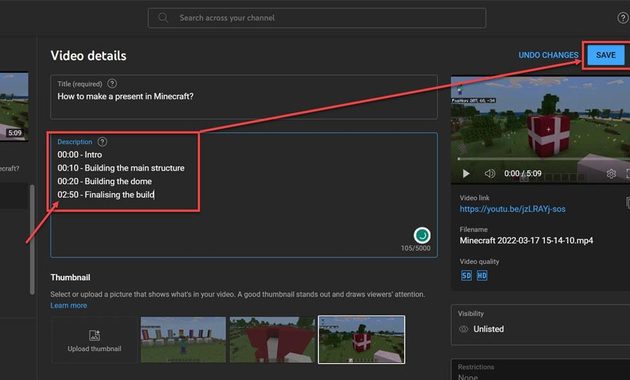
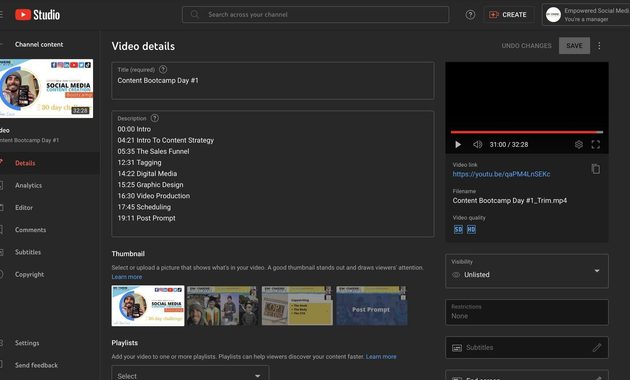
A three-hour recording becomes much more useful when someone can jump directly to the answer.
That is exactly what stream chapter markers are good at.
YouTube says chapters divide videos into sections with individual previews and make specific portions easier to revisit. Creator-added chapters require the first timestamp to start at 00:00 and at least three timestamps in ascending order.
Write Chapters Like Search Queries
Weak:
00:00 Introduction
24:30 Discussion
58:10 More Tips
Better:
00:00 Beginner SEO Mistakes
24:30 How To Find Long-Tail Keywords
58:10 Fixing Poor Google Rankings
The second version gives viewers immediate context.
It also creates useful textual signals around specific sections of the video. YouTube says chapters add information and context to each portion of a video, and chapters may also appear in transcripts.
Build Chapters While You Are Still Live
This is the underrated workflow.
Keep a simple timestamp log during the broadcast:
- 00:00 Introduction
- 12:40 Main problem
- 31:15 Demonstration
- 47:50 Case study
- 1:18:20 Q&A
- 1:42:00 Final recommendations
After the stream, turn that rough log into polished chapter titles.
You do not need to predict every minute perfectly. The goal is to make a long replay navigable.
YouTube also provides transcripts that let viewers jump directly to particular lines of caption text, adding another layer of navigability to long-form content.
3. How Search Discoverability Can Create Passive Ad Revenue From Old Lives
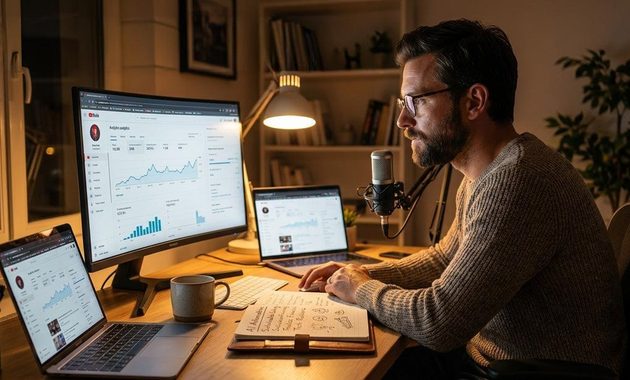
The real payoff of an evergreen broadcast is not simply more views. It is giving an old production another chance to generate value.
YouTube Analytics can show how viewers discover live content, including YouTube Search, external sources, suggested videos and playlists.
That makes search discoverability measurable rather than theoretical.
Look for:
- Search terms bringing viewers to the replay
- Watch time from search traffic
- Chapters receiving attention
- External sites sending visitors
- Videos that continue receiving views weeks later
If one replay starts attracting consistent search traffic, do not immediately replace it. Improve it.
Update the description, sharpen chapter titles, create related clips and link relevant resources.
When Old LIVE Content Can Still Make Money
For eligible monetized channels, YouTube supports advertising on live streams and live replays. Creators can see live and replay ad revenue in Analytics.
That is where passive ad revenue becomes realistic, but not guaranteed.
Ads are not automatically equivalent to income. YouTube notes that ad slots are not guaranteed to serve an ad, because its systems decide when ads appear based on several factors.
So the smarter goal is:
Search traffic → useful replay → longer viewing → monetization opportunity.
Not:
Upload old LIVE → wait for money.
The Evergreen Broadcast Checklist
Before leaving a valuable replay untouched, ask:
- Does the title match an actual search intent?
- Does the first paragraph of the description explain the answer?
- Are there useful chapter timestamps?
- Does the thumbnail promise a specific outcome?
- Can someone discover the video without knowing the creator?
- Does the replay still solve a relevant problem six months from now?
If the answer is yes to most of these, the recording has a much better chance of becoming a durable content asset.
And if advertising is part of the business model, review the current setup rather than assuming every replay earns equally. YouTube’s monetization system supports ads on eligible live content and replays, but delivery and revenue vary. For a deeper look at the current landscape, this YouTube Live ads review for 2026 is a useful companion resource.


Maeve Kelleher spent eight years working in boutique social media agencies, where she developed livestream campaigns for independent retailers, musicians, nonprofit organizations, and lifestyle brands. She has planned live launches, interviews, demonstrations, fundraising events, and audience question sessions. Her writing focuses on realistic social livestream strategies rather than empty promises about instant reach or overnight growth.